VilaVPN for every device
on your network.
vilanet for OpenWrt is the router-class VilaVPN client. Install one IPK,
log in once, and every device on your LAN — phones, TVs, IoT, consoles, laptops — exits
through VilaVPN with zero per-device setup. Managed from LuCI or UCI.
Two IPKs. One router. Every device covered.
VilaNet ships to OpenWrt as a pair of IPK packages — a vilanet-core service
binary plus a luci-app-vilanet web UI. Install both with opkg,
log in once, and every device on your LAN exits through VilaVPN. No per-device VPN apps,
no profile installs. Routing, DNS leak protection, and a kill-switch are managed in UCI
and visible in LuCI.
AES-256-GCM credentials envelope
Password is sealed with an AES-256-GCM envelope keyed off a per-device 32-byte secret in /etc/vilanet/device.secret. No plaintext password on flash; legacy plaintext is migrated transparently on first read.
Embedded sing-box 1.13
Hysteria2, VLESS-Reality, Trojan, VMess, AnyTLS, Shadowsocks-2022 — every protocol the VilaNet app supports, in one router-side binary. No external sing-box install needed.
LuCI + UCI native
Three LuCI tabs (Overview, Servers, Settings) plus the standard uci CLI, in 9 languages. Anything you can flip in LuCI is also a UCI option — perfect for scripts, Ansible, or backup-restore.
Full-device TUN
When TUN is enabled, every LAN client's traffic enters the tunnel — including DNS over the encrypted path. No per-device config, no PAC files, no client-side leaks.
Kill-switch
When the tunnel drops, the firewall blocks LAN forwarding paths that would bypass it — a fail-closed allow-list keeps essential maintenance paths reachable. Survives DHCP renewals and link bounces.
Per-device credential vault
Account credentials are sealed in an AES-256-GCM envelope keyed off a 32-byte per-device secret via HKDF. A casual strings dump reveals nothing useful, and a copied envelope file won't decrypt on a different router.
Pick your architecture
Pre-built IPKs for the latest release are published on the
GitHub releases page.
Pick the architecture that matches
opkg print-architecture on your router.
vilanet-istore-install_1.0.41.run from the releases page, then open iStore → Manual Install and upload the .run file. iStore installs everything automatically (core + LuCI + all languages). Skip the manual steps below.
.apk packages for OpenWrt 25 and newer, which uses the APK package manager instead of opkg. Both formats are published for every release.
opkg builds (the ar-format dialect) will reject it. Newer OpenWrt releases accept both.luci-i18n-vilanet-* packages. Starting with v1.0.8, all languages are bundled into
luci-app-vilanet. Remove any installed luci-i18n-vilanet-* packages
before upgrading to avoid file-clash errors (fixed automatically from v1.0.10+):
x86_64 — VMs, mini-PCs, modern routers
For Proxmox VMs, generic x86 routers, OPNsense-killer boxes, and OpenWrt-on-laptop builds. Verify with opkg print-architecture — you should see x86_64 in the output.
aarch64 — Raspberry Pi, modern ARM routers
For Raspberry Pi 4/5 running OpenWrt, modern ARM-based travel routers, and aarch64 VMs. Pick the aarch64_cortex-a53 or aarch64_generic variant that matches opkg print-architecture.
armv7 · cortex-a7 — older ARM routers
For older 32-bit ARM routers with cortex-a7 cores (e.g. TP-Link Archer C7 v5, older GL.iNet GL-AR750S). Check opkg print-architecture for arm_cortex-a7_neon-vfpv4 or similar. Same performance profile as mipsel — RAM is the binding constraint.
armv5 · arm926ej-s — legacy ARM routers
For older 32-bit ARM routers that report arm_arm926ej-s. Prefer a quick package-manager install test on the target before broad rollout; RAM and flash space are usually the binding constraints.
mipsel_24kc — older TP-Link, Xiaomi, Netgear
For older 32-bit MIPS-LE routers. RAM is tight on these boards — expect ~25–40 MB resident for the sing-box runtime under load. If opkg refuses to install due to free-space, swap-on-USB usually fixes it.
opkg print-architecture. The last column of any line is the architecture string — pick the IPK whose filename ends in that suffix. If you see arm_cortex-a7_neon-vfpv4, select the armv7 · cortex-a7 option; if you see arm_arm926ej-s, select armv5 · arm926ej-s. For anything else exotic, contact [email protected] with your opkg print-architecture output.
From flashed router to working tunnel
Both IPKs installed? These four steps take you from a freshly-flashed router to every LAN device exiting through VilaVPN. Run them from the router's shell.
1. Authenticate
Log in once. The password is sealed into /etc/vilanet/.credentials with AES-256-GCM — no plaintext on flash.
2. Browse your nodes
List packages and servers. Node IDs are stable hex digests — safe to scriptify or paste into UCI.
3. Connect
Connect to a country, a specific node ID, or let auto-select choose. The service brings up sing-box on TUN and updates the firewall rules in one go.
4. Verify on a LAN client
From any device on the LAN, check the public IP. It should match the exit node — proof that traffic is taking the encrypted path.
From LAN port to exit node
Every LAN client's packets are intercepted by the router's TUN device, handed to the embedded sing-box for protocol multiplexing, encrypted, and sent over the WAN port to a VilaVPN exit node. DNS rides the same encrypted path; the kill-switch firewall rules ensure nothing leaks if the tunnel drops.
Three tabs do everything
After installing the LuCI app, open
http://router.lan/cgi-bin/luci/admin/network/vilanet in a browser. Sign in with
the same credentials you use for OpenWrt's admin UI. You'll see three tabs.
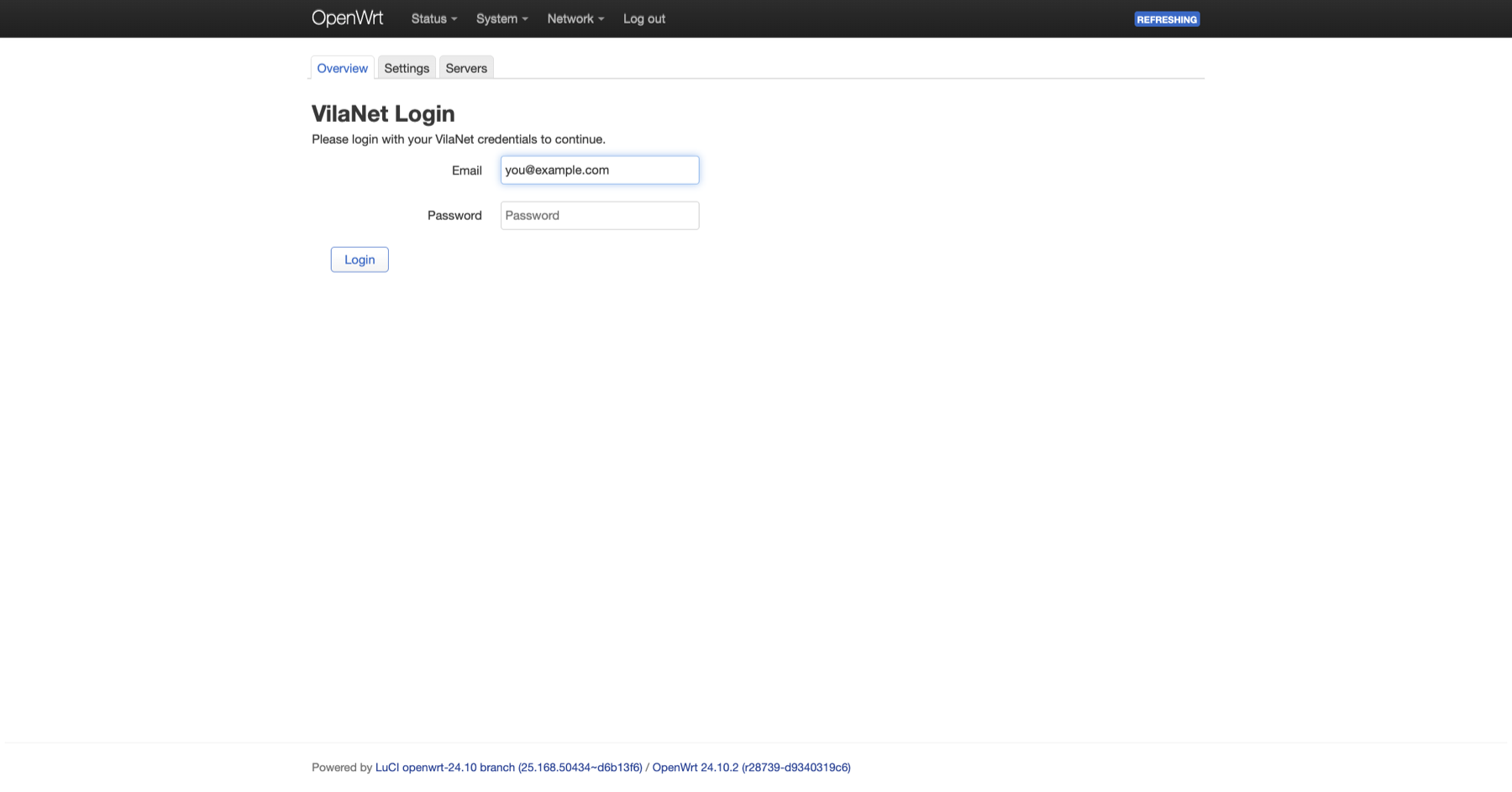
Sign in
First visit shows the sign-in card on the Overview tab. Enter your VilaVPN email and password — credentials are sealed into the AES-256-GCM envelope at /etc/vilanet/.credentials on the router. Nothing is stored in the browser.
Overview · post-login
After signing in, Overview becomes the live dashboard: VPN service state, selected server, routing mode, account, and a Quick Actions panel for connect / disconnect / mode switching without leaving the page.
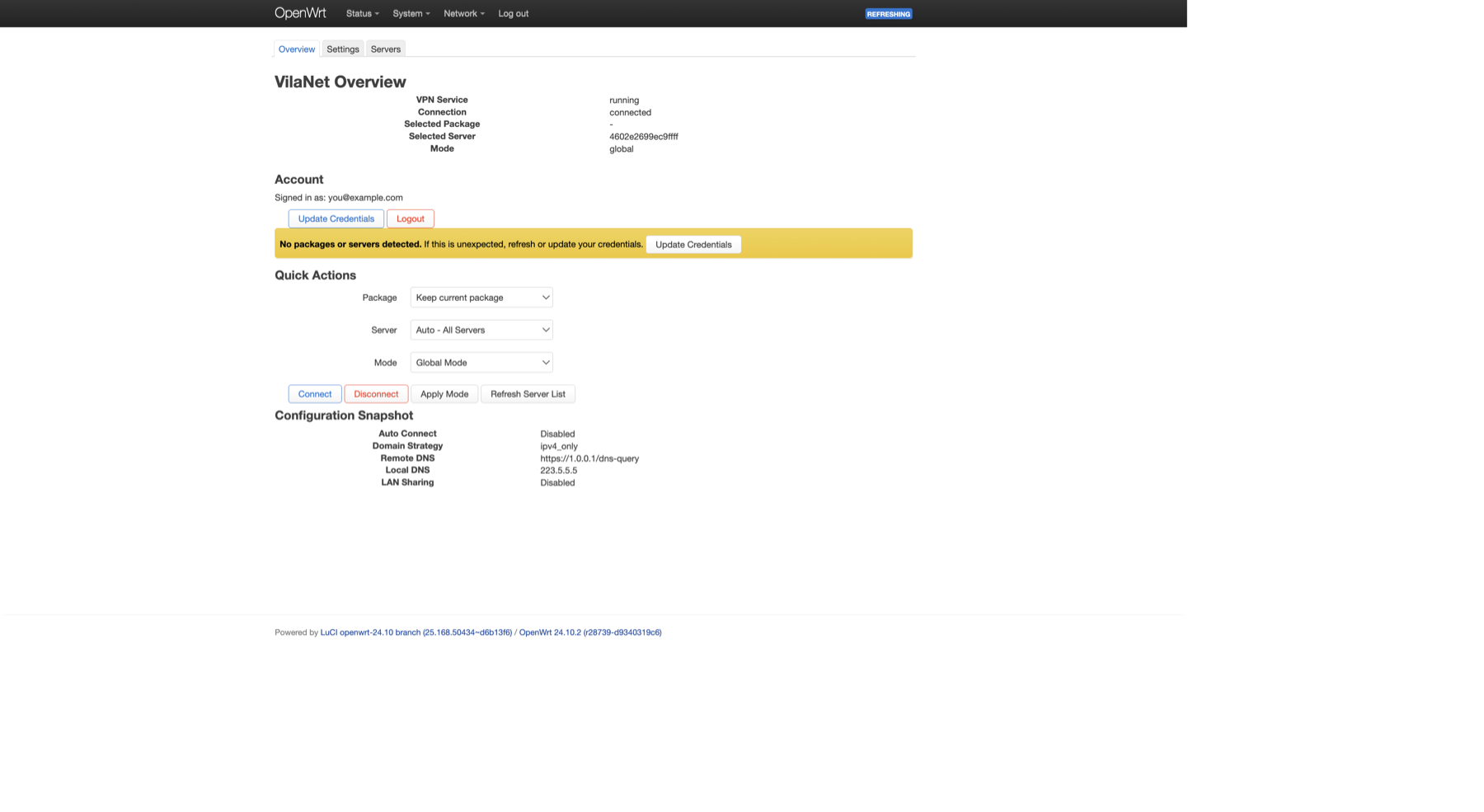
running, connection connected, selected node visible, account signed in. The Quick Actions block lets you connect/disconnect/swap mode in place; Configuration Snapshot echoes the most useful UCI knobs as a sanity check.
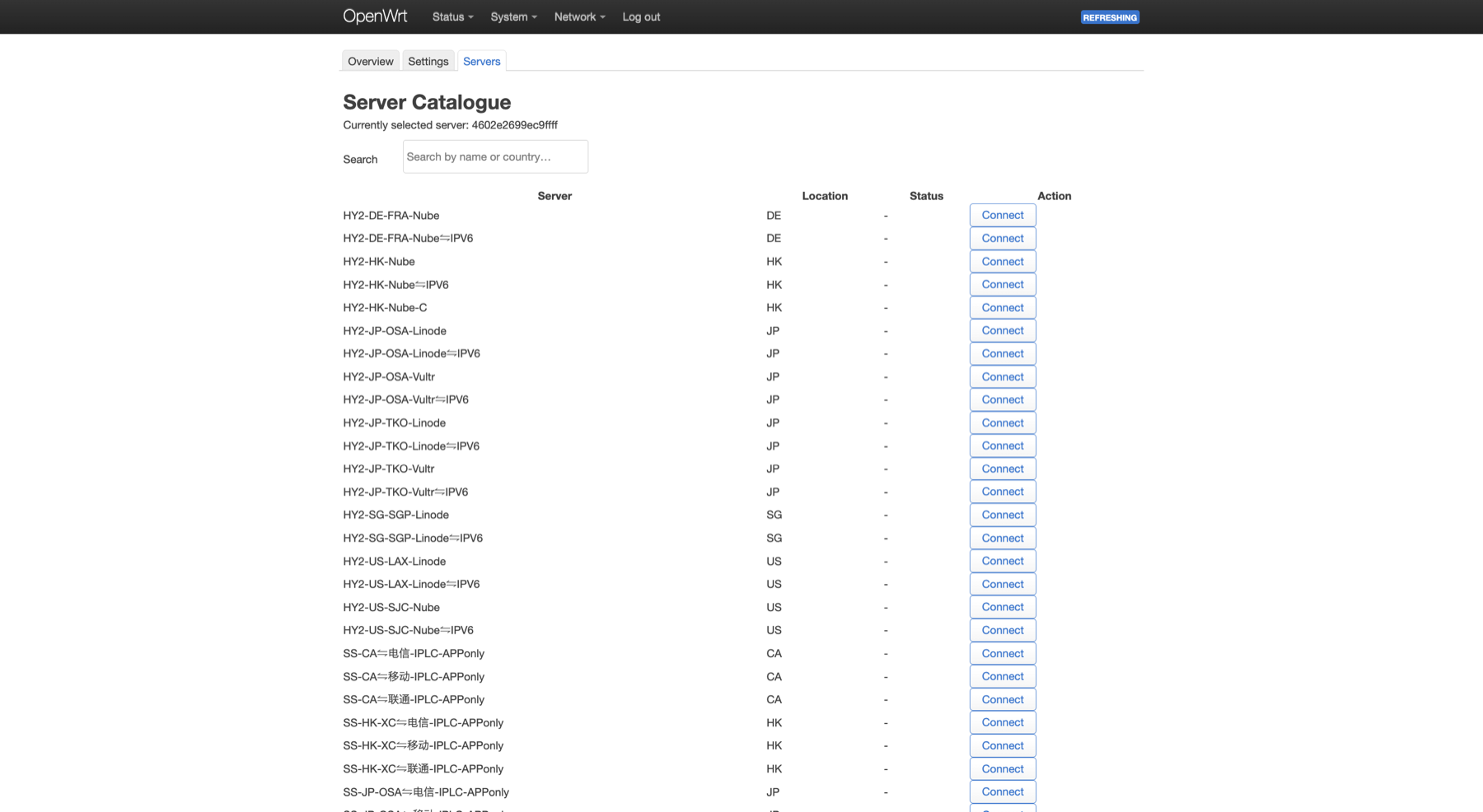
Servers · pick any node
The full server catalogue with a live search filter and a per-row Connect button. Rows show the node name and country; the currently selected node ID is pinned at the top.
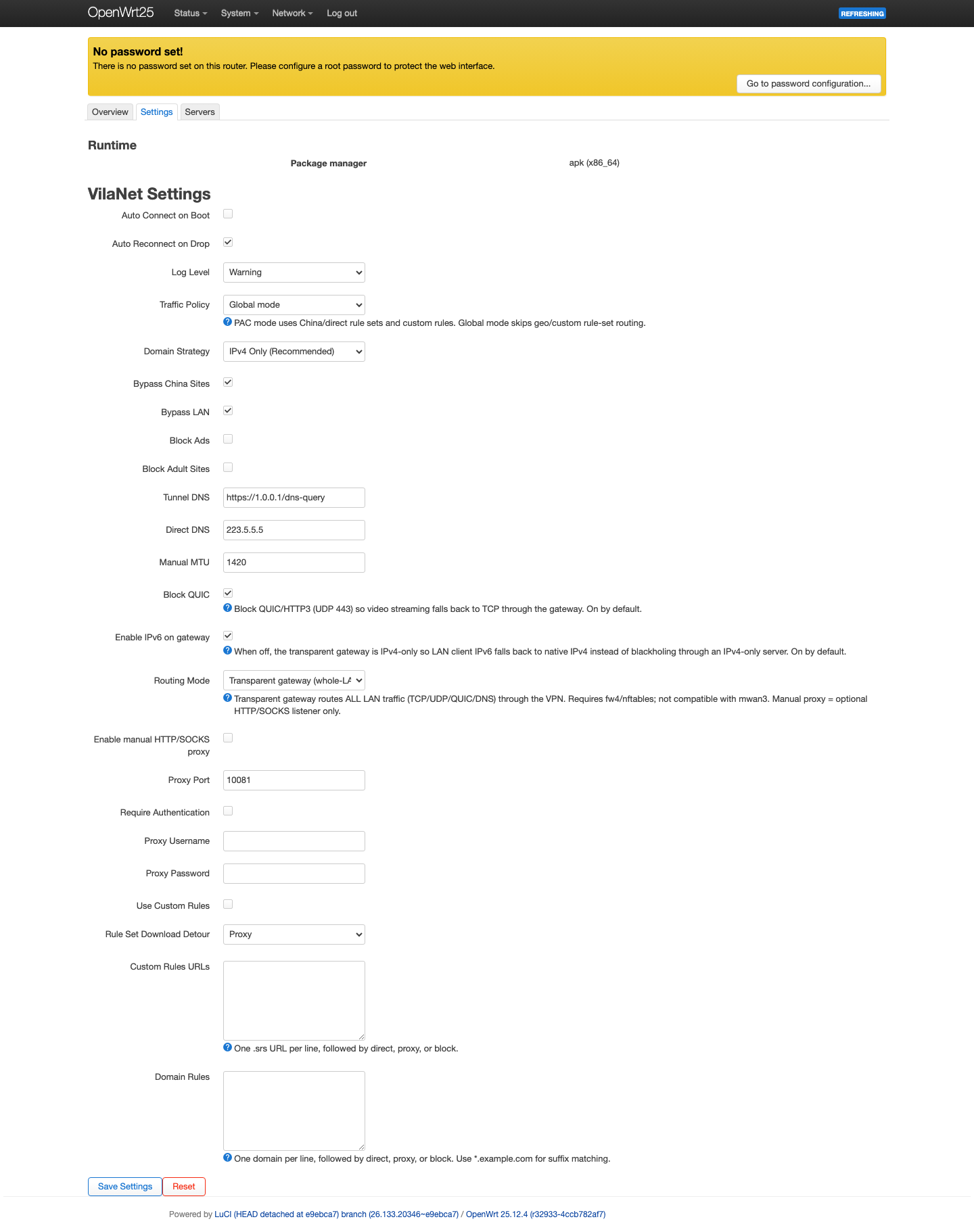
Settings · every UCI knob
All UCI keys surfaced as form fields: auto-connect, domain strategy, tunnel/direct DNS, MTU, LAN proxy sharing, authentication. Save Settings writes UCI; traffic-policy and routing-mode changes restart the service when connected, while other network changes apply after reconnect.
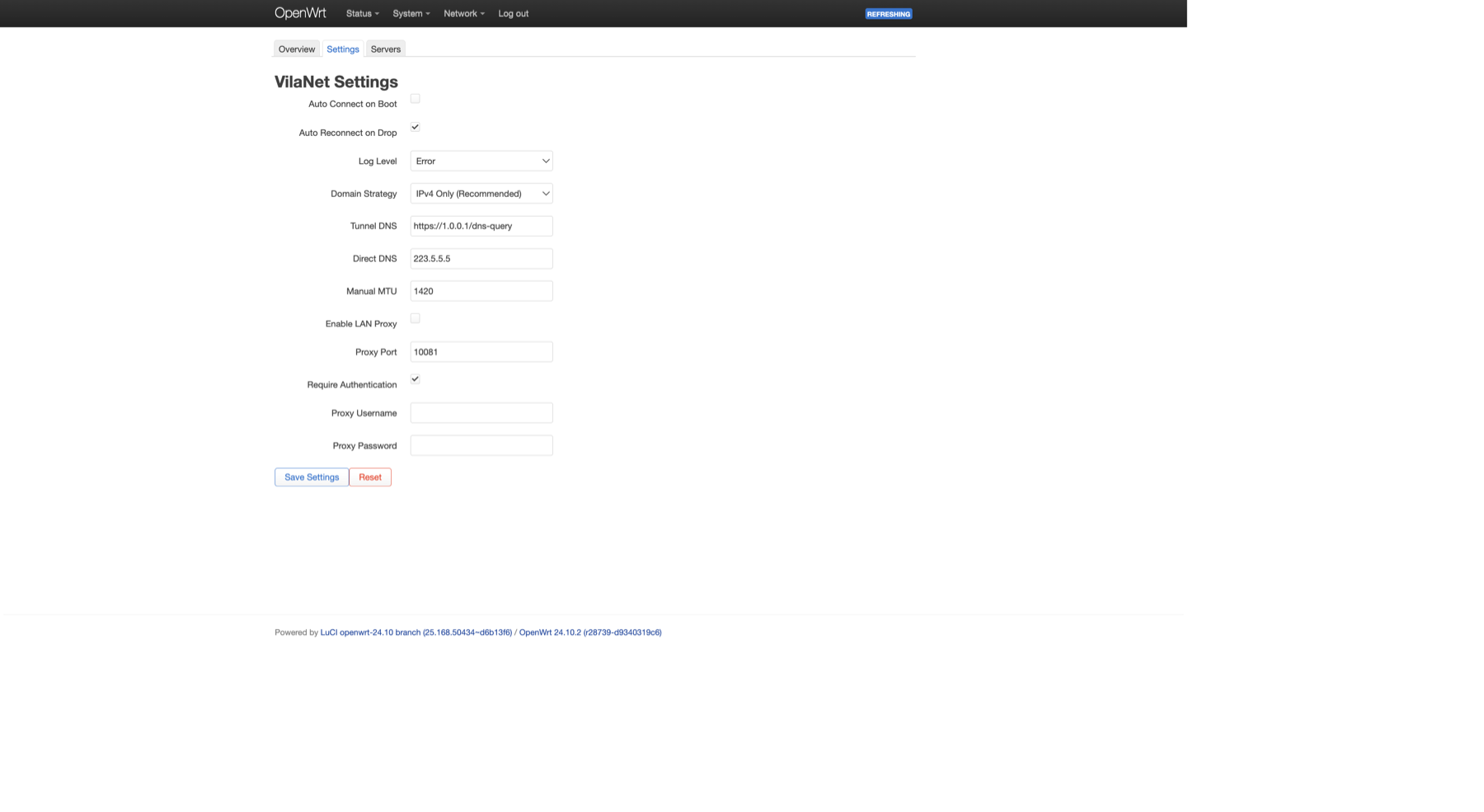
uci set + uci commit steps for you, and restarts only when the selected mode needs it.
vilanet on the shell
Every LuCI action has a CLI equivalent. Run vilanet help for the index, or
vilanet help <verb> for per-command flags. All output is plain text by
default — pass -json on read-only commands to get machine-readable output.
login
Interactive prompt → seals email + password into the AES-256-GCM credentials envelope. Idempotent.
logout
Erases stored credentials and the cached package list. Idempotent.
status
Live state: connected node, public exit IP, uptime, Tx/Rx, protocol. Returns exit 0 when connected, 3 when idle.
connect
Bring up the tunnel. Flags: -country ISO, -node ID, -package NAME. With no flags, picks from the active UCI selection.
disconnect
Tear down the tunnel. Restores baseline firewall rules. Idempotent.
servers
List nodes. Filter with -country / -package. Add -json for scripting.
packages
List packages on your account: name, node count, system type, due date.
mode
Switch traffic policy for traffic that already enters sing-box: global (send captured/proxied traffic through the VPN), rule (smart China bypass), or pac (alias for rule). Whole-LAN capture is controlled separately by routing_mode: proxy is transparent REDIRECT/TPROXY mode, manual_proxy is manual HTTP/SOCKS only, and tun is the transparent gateway.
config
Read or write any UCI key. Sub-verbs: show, get, set, show-singbox. Setting auth.email or auth.password is rejected with a redirect to vilanet login.
diagnostics
Writes a redacted .tar.gz support bundle: log tail, redacted UCI, public-node DTOs, environment. Mode 0600. Safe to email to support.
version
Print version, sing-box version, build hash. Useful in bug reports.
Interactive terminal simulator
Type any vilanet command below and see the (simulated) output. Or click a chip
to drop in a ready-made example. No router required — it all runs in your browser.
/etc/config/vilanet — every knob
Every LuCI form field is backed by a UCI option in /etc/config/vilanet.
Read with uci show vilanet; write with uci set vilanet.<section>.<key>=<value> && uci commit vilanet.
Changes take effect after /etc/init.d/vilanet restart.
global
| Key | Values | Description |
|---|---|---|
enabled | 0 · 1 | Run on boot when 1. Set by connect / disconnect. |
auto_connect | 0 · 1 | Bring up the tunnel automatically when the service starts. |
auto_reconnect | 0 · 1 | Re-dial the same node on transient failure. |
selected_server | node ID | Stable hex digest of the active node. |
selected_package | package ID | Constrains selected_server to a package. |
connection_mode | rule · global · pac | Traffic policy for traffic that already enters sing-box. rule (default on fresh installs; pac is an alias) enables smart China-bypass routing; global sends captured/proxied traffic through the VPN. Upgrades keep the mode you already have. This does not transparently capture LAN clients; use routing_mode=tun for that. |
routing_mode | tun · proxy · manual_proxy | tun = default whole-LAN transparent gateway — every LAN client's traffic captured via TUN, zero per-device config. proxy = Passwall-style transparent proxy via TCP REDIRECT + UDP TPROXY. manual_proxy = SOCKS/HTTP inbound only (LAN devices proxy-aware). |
log_level | error · warn · info | Verbosity for /var/log/vilanet.log. Clamped to {error, warn, info} — debug and higher are not persisted via UCI; use VILANET_DEBUG=1 in the daemon environment instead. |
routing_mode=tun every LAN device's traffic is transparently captured — phones, consoles, IoT, anything — with zero per-device proxy setup. sing-box handles DNS and routing entirely on-router. To set it explicitly:
network
| Key | Values | Description |
|---|---|---|
domain_strategy | ipv4_only · prefer_ipv4 · prefer_ipv6 | How the resolver mixes A and AAAA. |
dns_remote | https://1.0.0.1/dns-query | DoH endpoint used over the tunnel. |
dns_local | e.g. 223.5.5.5 | Bypass resolver — used for direct-route names. |
bypass_china | 0 · 1 | Apply the geosite-CN / geoip-CN smart bypass rules. |
bypass_lan | 0 · 1 | Keep RFC1918 traffic on the direct path. |
sniff_enabled | 0 · 1 | Leading sniff rule on inbound — needed for SNI-based routing. |
mux_enabled | 0 · 1 | Multiplex outbound where the protocol supports it. |
tun_enabled | 0 · 1 | Legacy renderer toggle. Runtime whole-router capture is controlled by global.routing_mode=tun. |
dns_mode | fakeip · real | sing-box DNS strategy — fake-ip is faster, real-DNS works with apps that don't honour DNS. |
block_ads | 0 · 1 | Geosite-category-ads reject. |
block_porn | 0 · 1 | Geosite-category-porn reject. |
block_dot | default · 0 · 1 | Tri-state. default = on. Blocks DNS-over-TLS on the LAN to force resolution through the tunnel. |
block_quic | default · 0 · 1 | Tri-state. default = on. Blocks UDP/443 so HTTP/3 falls back to TCP/TLS, eliminating QUIC-path DNS leaks. Also fixes blank-page errors in Chrome and Google apps (including Gemini) when the QUIC handshake fails mid-tunnel — the no_drop reject rule redirects rather than silently drops the packet. |
block_stun | default · 0 · 1 | Tri-state. default = off. Blocks STUN endpoint discovery — useful for WebRTC IP leak prevention. |
enable_ipv6 | 0 · 1 | Allow IPv6 over the tunnel. Off by default — many exit nodes are v4-only. |
mtu | e.g. 1420 | TUN MTU. Lower if you see fragmentation on bridged uplinks. |
proxy (LAN SOCKS sharing)
| Key | Values | Description |
|---|---|---|
enabled | 0 · 1 | Expose SOCKS5+HTTP on the LAN. Opt-in — off by default. |
port | 10081 | Mixed-inbound listen port. |
auth_enabled | 0 · 1 | Require username + password. Default on. |
auth_user | string | Proxy username. |
auth_pass | string | Proxy password. |
kill_switch
| Key | Values | Description |
|---|---|---|
enabled | 0 · 1 | Block LAN forwarding paths that would bypass the tunnel. The fail-closed allow-list is maintained internally — no manual sync needed. |
global.routing_mode=tun as well.hy2 (Hysteria2 tuning)
| Key | Values | Description |
|---|---|---|
speed_mode | off · server_default · custom | Default off (BBR). server_default uses the package's advertised cap. custom honours custom_mbps. |
custom_mbps | e.g. 200 | Mbit/s in both directions. Only used when speed_mode='custom'. |
hop_interval | seconds, e.g. 30 | Port-hopping interval — improves resilience under aggressive throttling. |
domains (custom rules)
Custom rules apply before the geosite block, so they override defaults. Each entry is <domain> <action> where action is bypass, proxy, or block. Wildcards: *.youtube.com matches subdomains; bare youtube.com matches exactly.
clash_api (off by default)
| Key | Values | Description |
|---|---|---|
enabled | 0 · 1 | Expose sing-box's clash-api on 127.0.0.1:<port>. Router product is headless, so off by default. |
port | 9090 | Clash-API listen port. Loopback only. |
secret | string | API token. Shown as secret_set: true in config show, never as plaintext. |
uci set must be paired with uci commit vilanet to persist, then reconnect or restart the service for runtime-only changes. LuCI's Save Settings commits for you and restarts only when the selected mode needs it.
Where everything lives on the router
The IPK is well-behaved: every file goes to a predictable path. Useful for backup-restore, Ansible playbooks, and post-mortem debugging.
| Path | Purpose |
|---|---|
/usr/bin/vilanet | Service binary (single static Go executable, embedded sing-box). |
/etc/init.d/vilanet | procd init script: start · stop · restart · enable. |
/etc/config/vilanet | UCI config — the table above documents every key. |
/etc/vilanet/device.secret | 32-byte per-device secret. Mode 0400. Never back this up to git or cloud storage. |
/etc/vilanet/.credentials | AES-256-GCM-sealed credential blob. Mode 0600. Legacy plaintext is migrated on first read. |
/var/log/vilanet.log | Rolling daily log file. vilanet diagnostics bundles the tail. |
/var/run/vilanet.pid | procd PID file. |
/var/lib/vilanet/ | State directory — sing-box working state, cached package list. |
/usr/libexec/rpcd/vilanet | rpcd shim — LuCI talks to vilanet through this. |
/www/luci-static/resources/view/vilanet/ | LuCI JS views: overview.js, servers.js, settings.js. |
device.secret leaks, the AES-256-GCM credentials envelope is decryptable. Exclude it from cloud backups, Ansible vaults, and config-export images. Re-running vilanet login after a fresh generation invalidates anything sealed against the old secret.
When something's off, start here
opkg refuses to install (Cannot satisfy the following dependencies / Malformed package)
The IPK ships in tar/ustar 1.0 format. Older OpenWrt builds with the ar-format opkg dialect reject it. Upgrade to OpenWrt ≥24.10, or use the matching archive/ snapshot for your release.
opkg upgrade fails with file-clash / "exists on filesystem" error
Upgrading from an earlier split-package layout (where translations shipped as separate luci-i18n-vilanet-* IPKs) to the bundled layout (v1.0.8+, where all translations are included in luci-app-vilanet) could produce file-clash errors. Fixed in v1.0.10. If you see this error on an older install, remove the old translation IPKs first: opkg remove luci-i18n-vilanet-zh-cn luci-i18n-vilanet-ja (or whichever locales are installed), then re-run opkg install luci-app-vilanet_*.ipk.
Chrome, Edge, or Google apps show a blank page through the tunnel
The browser tried QUIC (HTTP/3) to reach a Google endpoint, the sing-box reject rule silently dropped the UDP/443 packet instead of sending an ICMP unreachable, and the browser waited for a timeout before falling back to TCP — resulting in a blank page. Fixed in v1.0.11 (vilanet-core v0.1.8): the sing-box config now emits a no_drop reject action so the browser falls back immediately. If you're on v1.0.10 or older, upgrading to v1.0.11+ resolves this.
vilanet status says "idle" but connect just printed Connected
Check the log: logread -e vilanet and tail -200 /var/log/vilanet.log. The most common cause on old builds was a routing-mode/DNS mismatch; current releases fix that path. If you're on an older build, try vilanet mode rule as a workaround, then upgrade.
LAN clients get connectivity drops every few seconds
Almost always MTU. Drop network.mtu from 1420 to 1380 (some PPPoE uplinks) or 1280 (encapsulated WAN). Restart the service after each change.
YouTube / Netflix is slow, but speedtest is fine
Browser is preferring QUIC. With block_quic=1 (the default) sing-box rejects UDP/443, forcing the browser to fall back to TCP. Either accept the fallback (slight loss in throughput) or set block_quic=0 if you accept the DNS-leak risk.
"Failed to bind TUN" / "operation not permitted"
TUN needs the tun kernel module. opkg install kmod-tun if missing. Some minimal OpenWrt images strip it.
Login keeps failing with "invalid credentials" — but the password is right
Probably a stale envelope from before device.secret was rotated. vilanet logout && vilanet login reseats both files. If that fails, delete /etc/vilanet/.credentials manually and log in again.
Need to ship a bug report
Run vilanet diagnostics. It writes a redacted .tar.gz bundle (log tail, redacted UCI, public-node DTOs, environment) to /var/lib/vilanet/diag/. Mode 0600. Email the file to [email protected].
logread -f | grep -i vilanet in one window and the failing command in another tells you everything.
Drive vilanet-openwrt with your AI
vilanet-openwrt ships a universal Agent Skill at ai/vilanet-openwrt/SKILL.md — a single plain-markdown file that teaches Claude Code, Codex CLI, Gemini CLI, Cursor, Cline, Aider, Copilot CLI, and any other modern AI assistant how to drive the router-side VPN on your behalf. Install on the machine you SSH into the router from, then ask your AI to install the IPK, flip UCI keys, drive ubus call vilanet ..., or diagnose a stuck connection.
Claude Code
Drop the skill file into ~/.claude/skills/vilanet-openwrt/SKILL.md on your laptop. Claude Code auto-discovers it on next start, so any new session can install IPKs, flip UCI keys, and drive ubus end-to-end.
Gemini CLI ≥ 0.41
Use native Agent Skills support. From a local checkout the skills link form is the fastest path; on older Gemini builds, append a @./relative-path import to GEMINI.md instead.
Codex CLI · Cursor · Cline · Aider · Copilot CLI
The skill content is identical across every tool — only the install path differs. Write to a neutral location, then point your AI at it (and, for tools that read AGENTS.md, append idempotently rather than overwriting).
Once installed, here's how you talk to it
You don't need to memorise UCI keys, ubus methods, or LuCI menus. Once the skill is loaded, describe what you want in plain language — examples below are the kind of thing you can paste into your AI chat.
vilanet-core and luci-app-vilanet IPKs on my router at 192.168.1.1 — it's running OpenWrt 24.10.2 on x86_64.network.dns_mode=real and switch to connection_mode=rule (smart bypass), then restart so the config takes effect.vilanet connect. Pull a vilanet diagnostics bundle and tell me what's wrong.
Your AI translates the request into the right vilanet / uci / ubus invocation, runs it over your existing SSH session, and explains the result back in plain language.